In this review of DBAN I mention that it’s not the most user friendly product, but if you give it a couple stabs more often than not you’ll succeed. Keep in mind DBAN is open source and free. Commercial products often come with support where as open source, not so much. Now on to the DBAN review. Darik’s boot and nuke is Free Software one can use to boot and nuke your HDD (hard drive).
Software Disk Erase Solutions
But with so many open source and commercial software based solutions to erase your hard drive one might wonder what is the best and why? Lets review my top solutions one can use to nuke your hard drive.
- DBAN – free open source and works for a lot of systems. (Buy the CD here if you can’t burn it to disk yourself) Requires a working computer that can boot to disk or flash drive.
- Paragon has a bare-bones disk wipe package but I recommend the upgrade to Manager 15, this will give you SSD and HDD wipe plus backup and other PC utilities.
- WipeDrive is a long time favorite of mine. Sometime cheaper on Amazon but check their website price here.
Software based solutions will need to be ran from a disk or USB flash drive. They usually work with most systems and can be a little more difficult to figure out. However, they are cheaper than hardware based solutions. Software based solutions like DBAN, Paragon and WipeDrive are typically much slower than hardware based solutions.
Hardware Based Disk Erase Solutions
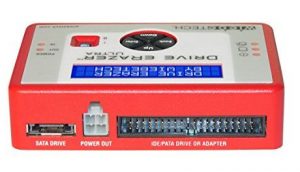
Erase SSD and HDD drives quick and easy.
Hardware based disk wiping solutions are much faster and easier the software based solutions. They are so fast that many business / enterprise level users use them before discarding computers. But as a home user they are still affordable enough that at the lower end I could see buying one simply due to the ease of use.
- USB 3.0 SATA Hard Drive Duplicator & Eraser Dock – Standalone 2.5/3.5in HDD & SSD Eraser and Cloner. Connect your 2.5in and 3.5in SATA HDDs or SSDs through a USB 3.0 connections. Good prices online at Amazon. Average cost $70
- StarTech Standalone 2.5in/3.5in SATA Hard Drive Duplicator and Eraser – HDD Hard Disk Drive Duplicator and Sanitizer. Erase up to 2 SATA hard drives simultaneously without a host computer. The HDD copier offers high performance duplication, and has been tested for speeds up to 14GB per minute. Compare prices Amazon.
- CRU Inc WiebeTech Drive eRazer Ultra – Hard drive eraser – native SATA and IDE/PATA, and more. Compare prices on Amazon and MacMall.
The cheaper models usually do not erase SSD drives. If you don’t know which type of hard drive you have I recommend buying one that does both. As technology progresses and as SSD gets cheaper I would imagine that most devices will come standard with SSD.
DBAN versus Commercial Software
DBAN is a free disk eraser located on source forge which will wipe most hard drives clear of all data. Many commercial software scrubbers claim they are military grade tech and trusted by government agencies and major corporations as their primary disk wipe utility. No matter what you choose, if you invest money in the software/hardware please ensure it wipes external hard drives, thumb drives, memory cards, SSD, HDD, SDHD, SDXD, iPods, MAC, etc. as the higher end options I’ve listed do.

If you don’ t mind paying a little cash I feel the commercial options are clearly the way to go. They’re easier to use and can be used to wipe the drive of many of your hardware devices which contain a hard disk.
Keep in mind during this review that if you lack a little geek in your blood DBAN could be difficult to get going however, with a little perseverance even the faint of heart can get DBAN to do what they need it to do. Feel free to ask questions below in the comment section.
“Darik’s Boot and Nuke (”DBAN”) is a self-contained boot program that securely wipes the hard disks of most computers. DBAN will automatically and completely delete the contents of any hard disk that it can detect, which makes it an appropriate utility for bulk or emergency data destruction on your hdd. The most recent release is beta DBAN 2.2.6. In order to install DBAN wants you to burn the file to a blank disc and boot the computer with it. Do not unzip this file.
DBAN is a means of ensuring due diligence in computer recycling, a way of preventing identity theft if you want to sell a computer, and a good way to totally clean a Microsoft Windows installation of viruses, malware, and spyware. DBAN prevents or thoroughly hinders all known techniques of hard disk forensic analysis. This means it writes over the existing data making it virtually impossible to recover the data it over wrote. Both wipe drive and dariks boot and nuke are great options to erase your hard drive.
All of these utilities will permanently wipe your hard drive clean with military grade “scrubbing” which simply means the software writes over your hard disk so many times it becomes unreadable with today’s technology.
Now one might ask “How do I use dban to erase my hard drive?” well I’m glad you asked! Below I’ll give you two simple to use instructions to autonuke your hard drive clean.
There are two ways to accomplish this, I’ll review both ways in simple form then break down the USB Flash installation in more detail. 1 – load dban to a CD, 2 – install dban on a USB flash drive
Simple dban CD install instructions – DBAN 2.x only:
- Download the most recent version of DBAN 2.x
- Burn the ISO to CD
- Insert the CD into your CD ROM
- Reboot your computer
- Follow the prompts
Installing DBAN on a floppy or USB flash drive
DBAN version 1.0.7 allows you to install the dban to flash drive or floppy disk. Here’s the simple step by step instructions:
- Download the exe file
- double click the exe file to execute it
- follow the instruction presented to load it onto you flash drive or floppy disk
If that didn’t work for you here’s more detailed installation instructions for Darik’s Boot and Nuke (dban-1.0.7_i386)
——————
1.0 About Darik’s Boot and Nuke
2.0 Installing DBAN
2.1 Creating the DBAN boot media on Microsoft Windows
2.2 Creating the DBAN CD-R disc on Microsoft Windows
2.3 Creating the DBAN floppy disk on Linux
2.4 Creating the DBAN CD-R disc on Linux
3.0 Using DBAN
3.1 Getting Help and Support
4.0 Configuring DBAN
4.1 Automatic Wiping
4.2 SYSLINUX.CFG
5.1 Free Updates
5.2 Contact Information
6.0 Advanced Features
6.1 Logging
6.2 PRNG Seeding
7.0 Legal
1.0 About Darik’s Boot and Nuke
——————————–
Darik’s Boot and Nuke (“DBAN”) is a self-contained boot floppy that securely
wipes the hard disks of most computers. DBAN will automatically and completely
delete the contents of any hard disk that it can detect, which makes it an
appropriate utility for bulk or emergency data destruction and cleaning.
2.0 Installing DBAN
——————–
2.1 Creating the DBAN boot media on Microsoft Windows
——————————————————-
Double-click the ‘dban-1.0.7_i386.exe’ program to install DBAN to a
floppy disk or USB flash device.
You must use an account with full hardware access to create the DBAN boot
media. This means that you must be a member of the administrators group or
have similar privileges on your Microsoft Windows computer. Virus scanners
and domain policies can prevent you from creating the DBAN boot media.
The USB booting capabilities of many computers are incomplete or broken. Most
computers capable of booting from a USB device require that it report a
removable media type, and that it be unpartitioned and smaller than two
gigabytes (so that the BIOS can boot it like a floppy disk).
If the drive letter of your USB device does not appear in WinImage drive list,
then it is an unsupported media type. In particular, most USB+IDE bridge
implementations are unrecognized, which means that a 2.5 inch hard disk in an
external USB enclosure is incompatible.
2.2 Creating the DBAN CD-R disc on Microsoft Windows
———————————————————–
If you do not have a floppy drive, or if you wish to use a CD drive or
DVD drive instead, then get the “CDR/CDRW version” from the DBAN home page,
which is an ISO file.
The DBAN FAQ has a tutorial for burning the DBAN ISO on Microsoft Windows.
If you already have burning software installed on your computer, then
double-click the ISO file to burn DBAN to blank CD-R or CD-RW media. Keep all
defaults for mode and emulation if you burn the ISO file with a product like
Nero Burning ROM.
If nothing happens when you double-click the DBAN ISO file, or if the “Open
With” dialog that asks you to “choose a program” starts, then you do not have
burning software installed that understands the ISO format.
Note that CD-ROM drives manufactured before 1998 often have problems reading
CD-R media, and will sometimes damage it. Try to use a DBAN floppy disk on
older computers.
Similarly, CD-RW media is often more problematic than CD-R media. Try to use
CD-R media with DBAN, especially on older computers.
2.3 Creating the DBAN floppy disk on Linux
——————————————-
# unzip dban-1.0.7_i386.exe
# dd if=dban-1.0.7_i386.ima of=/dev/floppy bs=1024
The DBAN EXE file is a regular zip file with the WinImage SFX module prepended.
InfoZip, which is bundled with most Linux distributions, can unpack the DBAN
EXE file. Ignore any offset warnings.
If /dev/floppy does not exist on your computer, then try /dev/fd0 or
/dev/floppy/0 instead. This command also works on BSD systems.
2.4 Creating the DBAN CD-R/CD-RW disc on Linux
———————————————–
# cdrecord dban-1.0.7_i386.iso
Ensure that the /etc/defaults/cdrecord file is properly configured for your
computer.
3.0 Using DBAN
—————
Boot the computer with the DBAN media like you would boot a DOS startup disk or
like you would reinstall an operating system. DBAN cannot be started from
within Microsoft Windows.
Doing this often requires changing the “boot order” of the computer so that
DBAN is started before the operating system on the hard disk is started.
Run the built-in BIOS setup program and put the floppy drive and the CD-ROM
drive first in the boot order. Do this by pushing <ESC>, <DEL>, <F1>, or <F2>
when you power-on the computer. The correct button and menu changes vary
between computers. Watch for a prompt when you power-on the computer or
consult the motherboard documentation.
Let’s say you choose a floppy disk. Insert the dban floppy and boot to it.
Dban has an automatic mode – type “autonuke” to enter into auto mode to completely erase your hard drive clean.
Now that autonuke is loading give it a minute or two to start. If it fails then reset your computer and at dban start up press f4 for troubleshooting hints.
Now that DBAN has started erasing your hard drive the speed will vary based on the size and speed of your hard drive.
If DBAN isn’t working out for you I highly recommend System Mechanic Pro!
3.1 Getting Help and Support
—————————–
First, read the frequently asked questions at:
dban.org/faq/
Second, search for an answer and then ask for help in the forum at:
sourceforge.net/forum/forum.php?forum_id=208932
Third, send email to support@dban.org and ensure that you have “DBAN” somewhere
in the subject line.
Include this information if you ask a question or make a support request:
1. The DBAN release that you are trying to use. (eg: dban-1.0.7)
2. The DBAN media that you are trying to use. (eg: floppy disk)
3. The computer manufacturer and model information. (eg: Dell OptiPlex 170L)
4. The exact message that you see. (eg: “DBAN failed with error 255.”)
5. Anything else that is unusual about your computer or pertinent to the
situation. (eg: “I am trying to hot swap my disks.”)
Contact us if you wish to purchase a support contract.
You are also welcome to call us directly if you have previously purchased a
DBAN enhancement or customization, or if you have made a donation or other
contribution to the DBAN project.
4.0 Configuring DBAN
———————
4.1 Automatic Wiping
———————
Enter “autonuke” at the boot prompt to automatically wipe all devices in the
computer without confirmation.
4.2 SYSLINUX.CFG
—————–
The “A:\SYSLINUX.CFG” file is the DBAN configuration file. You may change the
default behavior of DBAN by editing this file after you create the DBAN floppy
disk. The SYSLINUX.CFG is self-documented.
The CDR/CDRW version of DBAN must be remastered to change the SYSLINUX.CFG file
that is embedded in the ISO file. DBAN will fail if the ISO file is changed by
an editor like IsoBuster.
5.1 Free Updates
—————–
If you wish to be automatically notified of DBAN updates, then visit:
sourceforge.net/project/monitor_project.php?group_id=61951
A similar service is provided by:
freshmeat.net/subscribe/31200/
5.2 Contact Information
————————
General inquiries: dajhorn@dban.org
Help and support: support@dban.org
All e-mail messages must have “DBAN” in the subject line. Messages
Post your questions below and I’ll do my best to help you. First and foremost you’ll need to ensure you have the most recent version of DBAN. If you still can’t erase your hard drive with DBAN post your question below.
Or, take the easy route with iolo System Mechanic Pro!
Hello
I have a notebook system with Vista, no floppy. I downloaded the software on a CD-R. I may have to use a USB flash device. With this Vista where do I locate the prompt? I turned off the system with the power switch then when I power it up it asks if I want to logg in safe mode, or command prompt? I selected command prompt. Then I selected the drive letter E: dir Then typed as instructed: autonuke. The system answered: “Autonuke is not recognized as an internal or external command, opereable program or batch file.” looking for a .exe command? None. What do I do? use a USB flash device for this area?
I am so happy for so many wonderful responses of this utility. I really want to format Vista. LOL
Mike
You must use an account with full hardware access to create the DBAN boot
media. This means that you must be a member of the administrators group or
have similar privileges on your Microsoft Windows computer. Virus scanners
and domain policies can prevent you from creating the DBAN boot media.
The USB booting capabilities of many computers are incomplete or broken. Most
computers capable of booting from a USB device require that it report a
removable media type, and that it be unpartitioned and smaller than two
gigabytes (so that the BIOS can boot it like a floppy disk).
If the drive letter of your USB device does not appear in WinImage drive list,
then it is an unsupported media type. In particular, most USB+IDE bridge
implementations are unrecognized, which means that a 2.5 inch hard disk in an
external USB enclosure is incompatible.
your link to download dban gives error
the link now works.. sorry about that and thank you for letting me know
dariks boot and nuke doesn’t work well and Im thinking about wipedrive. dban non fatal errors are driving me nuts! I use dban with a floppy, have any of you tried dban iso? also Im wondering if I download dban from the wrong place (downloads.com)? to many questions surrounding dban so I think it’s time to nuke dban lol no pun intended.
The enterprise version of DBAN, named EBAN, is worth a look, if you are considering DBAN alternatives that cost money. The development of DBAN seems to have slowed in favor of EBAN’s development. Of course, maybe that’s because DBAN doesn’t make any money for the author.
Well I purchased wipedrive and it works like a charm. I did try to find eban and had no luck with google..
I have a MAC.. how can I erase it’s hard drive?
wipedrive both Supports all PC and Mac Computers (Intel, AMD & PowerPC)
dban supports many Intel, AMD & PowerPC
dericks boot and nuke AKA DBAN. That’s all you need to know for emergency disk wipe. Commercial products cost to much.. or you can just call me an open source hippy
If you’re going to pay for software to erase your hard drive ensure you use software that adheres to DOD standards for data removal such as software like my reference of wipedrive above.
Thank you whoever wrote this! I used wipedrive for my blackberry and dban on my laptop they both work great!
Kilroy, I want to erase my hard drive but need to be sure all data is erased from the drive. How can I make the data is indeed removed and can not be recovered?
HELIX is open source computer forensics software you can use to mount the wiped drive and try to recover or analyze the data. But hey if your PC won’t boot then you know it’s gone! Also wipedrive will tell you when it’s done and successfully removed all data.
Man I just used DBAN and it’s slow as hell. Even on the basic wipe option it’s super slow. I have a 80gb hard drive should it take more than 1 hour to erase?
In order to delete your entire hard drive it takes time. In simple terms DBAN and wipedrive both write over the existing data with 0’s and 1’s several times. Wipedrive is indeed faster but they both can take several hours depending on the size of your hard drive and the speed of your processor and hard drive. My 40 GB Drive on a P4 Intel Dual core takes less than an hour to wipe.
Good luck!!
How do you create a autobooting dban cd. Everywhere says if you edit the isolinux file it needs to be REmastered. How ? what does remastered mean ? any tips would be greatfully recieved. Could anyone post an idiots quide to create a customised autobooting Dban
simon.
what you want to do is burn dban to CD as an ISO – or data disk – try both I’m not sure what you have downloaded.
Then you’ll need go into bios and tell you system to boot to CD first!
Kilroy
Hi, I have a proplem with my Seagate Momentus 250GB Hard Drive. I was refered to BOOT and Nuke site by a sales guy at Best Buy. He said that if i use this DBAN I can then reset the hard drive to default and re-use it in my Playstation 3 console. My question is can this be done?
Rich,
You can erase just about any hard drive on the market with DBAN. Now I’m not sure if you can use any hard drive in a PS3 however if best buy tech guy said you can then chances are you can. Google PS3 hard drive replacement and see what you can find.
We use gdisk from Symantec Enteprise Ghost and an IBM disk wipe app that if you know what to ask at their website, is free. Both apps are DOD compliant, can be tweak to run automatically from a floppy or ISO disc, and I found out are the fastest (gdisk is of the two)
I burned DBAN to a CD-R and changed the boot order on my Dell PC (with Vista). When I got to the blue screen with Derik’s Boot and Nuke at the top and the boot prompt at the bottom, I could not get the computer to respond to the enter key or type in “autonuke.” Anyone know what’s wrong?
Thanks
what version of DBAN did you use? its best to download the most recent version.
hi i have tried using dban but everytime i run it it keeps looking for an external hardrive to wipe but because i dont have an external one then it wont wipe the drive i want it to
@linsey
change the boot options in bios to only boot to local harddrive – google how to do this based on the model of pc you’re running
Does wipedrive have same benfits as dban? Do they do the same thing with the difference being the cost of wipedrive versus the free dban? I am having problems with the dban and it is making me crazy. If wipedrive is as effective i would be willing to pay for wipedrive.
@Zac
wipedrive is for those of you that can’t make dban work for you or that just don’t feel like wasting your time with a slightly more technical open source product.. you get what you pay for. So with that said obviously wipedrive is easier to use and will work 99.999% of the time. But they both do that same thing. All in how much time you want to put into it.
Can anyone tell me if the MBR is still there after DBAN has done it’s job?
@Zagreus
Nope the MBR is erased..
I have s mac book pro which I am also running windows vista, how can I wipe clean all memory on the computer? Can DBAN do this?
What is the difference of doing this and zeroing the hard drive by the control options on the mac book of 7 and 35 pass re-write?
@Rosa
I believe Zero’ing your hard drive is just erasing your BMR.. these products here actually overwrite the data on your drive making it very very very hard for anyone to recover the data in the future.
after using dban and wipedrive can you reinstall a new operating system?
@ann
Yes you can install a new operating system.. its like you have a brand new hard drive!
@ann Of course!!
This article has been updated on March 15 2011 – let me know if you have any installation and data nuke issues.
Quick question – Once you have run dban and the wipe has finished, will it automatically ask for the my windows xp boot disc to be inserted? I dont want to run dban and then be left not know how to get my laptop operating again.
@Brian
After you wipe your hard drive you’ll know it’s done because you’ll be shown a system display that says “done” or something to that effect. You’ll then eject the DBAN cd AND Pop in your Operating System CD and reboot the device. Now just follow the direction Windows will prompt you so you can install a new OS.
It’s better to use Wipe Drive, but if you don’t have the money like me. Then get an ISO Burner, Open the darik’s boot and nuke iso file to the iso burner. then create cd. I prefer that you use high security on the darik boot and nuke.
I HAVE A BUG THAT I CAN NOT GET RID OF IT JUST KEEPS COMING BACK AS A LAST RESORT I WIPED MY DRIVE REINSTALLED WINDOS BUT ITS BACK WHAT I NEED TO KNOW IS WHEN YOU WIPE A DRIVE DOES IT ALSO GET RID OF THE MBR RECORDS IF IT DOES THEN MY BUG IS IN A PROGRAM I HAVE IF NOT THEN IT MUST SERVIE IN THE MBR NO PROGRAMS OUT THERE CAN TOUCH IT I HAVE TRIED LOTS OF PROGRAMS TO NO AVIL
@george scales
What is the error you get? If you wipe the drive it does remove MBR so I would expect any errors to be hardware related…
i have no error Ihave a bug which keeps cominig back now what i would like to know is when i wipe my drive is the mbr records wiped as well I need to know this as a prosess of alimanation if the mbr records are left in tacked then this could mean the bug is useing mbr to avoid elimanation this is one smart bug i have tried everything i could download as a trial or for free but nun have found the bug
yes your entire drive is cleaned during a full disk wipe.. DBAN erases the MBR during a full-disk wipe. DBAN does not remove the MBR if individual partitions are being wiped.
I autonuked a dell 4500. I’ve got the boot sequence set right but it doesn’t recognize my xp installation disk. It just goes to a blue and black screen that says “dell.com”. Any ideas?
go into your bios and tell it to boot to CD first –
if this doesn’t allow it to boot to CD – make sure the CD is clean!
if that don’t work wipe the drive again – try windows CD
let me know
Hi! I’m trying to completely erase a HD on an old computer. I burned the DBAN iso file to a CD using the Roxio Creator DE 10.1 “Data Disc” function (from Dell). I also configured the Boot Menu on the old PC to start with the D Drive (CD). But for some reason, it doesn’t recognize the CD. I’m sure you’ve addressed this issue countless times before, but any help would be greatly appreciated! Thanks.
with Roxio you need to choose ISO – also – if you can – I’d use the USB options with DBAN – it works when CD doesn’t,.
Hello,
burned the dban iso-file on CD. When I start dban to erase my Vista harddisk, and command ‘autonuke’ behind the prompt I got the message:”Dban finished with non-fatal errors.This is usually causedby diskswith bad sectors. Send the logfile with all support requests.
Saving logfileto floppy disk… a floppy disk in Dos format was not found. Dban finished. Press enter to save the log file._”
What can be wrong?
hard to say if I’m not on the PC – but your disk could be bad per the error message… how many times did you try it? have you tried USB? If you know your disk is fine you may try WipeDrive
I have a Windows 98 computer which has been unplugged and unused since 2005. I would like to wipe the hard drive clean and remove any information that might have remained on it after hitting the delete button.
What is the best way to do this?
RD
I have a Trojan and have been unable to get rid of by various means. I am pulling out all stops and currently running dban using the autonuke option. I have concerns about being able to install Windows 7 when dban completes because I’ve been reading on some sites that since the mbr is erased, the drive cannot be found. My question is, do I have to run fdisk/mbr after dban completes and before installing Windows 7?
after you clean with DBAN just slide the windows 7 CD in
Kurt – thank you for answering so quickly! If you don’t mind, I have another question please. I will have to partition and format this disk correct? And I will be prompted to do this when I insert the Windows 7 CD, correct?
Again – Thanks so much!
The CD will walk you through setup – it will ask you to choose a partition – if one doesn’t exist it will allow you to create one by selecting the free disk space – if windows ask you to format just say yes =)
Thank you !
Unless you really want to spend money, DBAN is an excellent tool…I am actually wipping out 102 Fiber Channel SCSI drives from a IBM DS4700 SAN using 4 virtual machine booted with DBAN 2.6.6. I mapped each single VM with 8 SCSI drives (single Raid 0 for each drive) using Raw Device mapping to give the software direct access to disk and disabled any cache process on the drives prior to start. 14 Tb will takes days, yes indeed ! No errors or particular problems so far.
@Jean-Pierre Yes we use DBAN all the time at work! it doesn’t work on some IBM and MAC systems – for those we use wipedrive so I do recommend the product.
Thanks for the comment!
Thanks for the article… I have been trying to find a program that will effectively erase all data. As a previous person stated, I had attempted wiping my hard drive multiple times to rid virus infection but even after fresh OS installation they seemed to show their ugly face. Rather annoying. Even Eraser with the guttman passes wouldn’t fully work. Granted it may be even more powerful then what I’m really in need of but if it works then it works. Thanks again!
glad it worked out for you!
I used DBAN and tried to reinstall windows 7. Now it’s like my dvd drive is not recognized to read the CD for reinstallation. I have changed the boot order and keep restarting my system, but cant get windows to load. Any suggestions?
@Todd – this is why I tell people to use WipeDrive… to late for you now =( DBAN works well but if you’re not a geek and things get hairy this is where you can find yourself.
Are you getting any options at all? Can you choose advanced installation during the boot up?
If the CD drive isn’t loading period, no windows installation options, I recommend you reformat your hard drive.
How old is the PC? Can you post a screen shot of what you see when you put in the windows DVD – Also can you take a photo of the windows DVD and post it online at a place like http://www.flickr.com
I’ve been in touch by phone with the WipeDrive tech support folks (White Canyon Software). The newest version of WipeDrive (v. Six) will NOT, I repeat NOT, work on the old PowerPC Macs, and neither will version Five. It only works on the newer Intel Macs. There used to be a separate version (back around the time of v.3) for Macs that came with 2 discs, one for PowerPC and one for Intel Macs. But it’s not made anymore, and they don’t have any of the old discs hanging around.
Sooooo, I have an old PowerPc G4 that I want to do a Dept. of Defense wipe on, and I can’t get it done. The Mac disc utility can be used to wipe the disc up to 35 times, but only if I connect my Mac to another Mac, and wipe the connected drive from there. I do not have access to another Mac, this option won’t work for me, and you can’t do a secure wipe on the drive you’re using, it won’t let you. So what are my options here? The DBAN stuff is unlikely to work well on my old machine, and I’m not techie enough to get through all the complicated instructions. WipeDrive works great, I’ve used it many times, but I’ve never been stopped cold with a PowerPC Mac before. The answer seems to be to get ahold of an old WipeDrive disc, but I can’t find a copy (I’m scouring the Internet, Craigslist, eBay, etc., no such luck). Does ANYONE know how I might obtain a copy? I’m out of options. Thanks for the help : )
Hey, I am currently wiping a drive using DBAN CD boot option, because I acquired some sort of virus/trojan or some sort of malware that has allowed hackers onto my computer and all else seems to have failed. I made an attempt to run Xubuntu 12.04 as a fresh install on the drive without wiping it first, so obviously the hacker was able to locate the file again. Anyways, I backed up my documents and booted DBAN. it seems to be working fine, however there is one concern. Prior to starting the service, DBAN listed the drives and it had one that was odd: “[????] Unknown Device” or something along those lines and to the bottom of that was my HDD “dev/sda” but the space was limited to ~117GB out of a total of 120GB. Is it possible for the virus to be inside that “[????]”? And if so, what, if anything can I do to delete that?
Thanks in advance!
Hi,
I want to save the logs in an floppy or in an USB drive. Can you guide me with the steps.
Turn on or restart your computer and watch for a message during the POST about a particular key, usually Del or F2, that you’ll need to press to …enter SETUP. Press this key as soon as you see the message.
log reporting for the dban? Never tried that.. and don’t think you can do it. You might want to call wipedrive and see if they do it.
its fixed sir, thanks!
Hi Kurt;
I have an old Dell PC with Windows Vista that has been sitting unused in my Den for a couple of years. I would like to recycle the computer and wanted to get all my information wiped off the HD before I send it in. I downloaded the latest version of DBAN (2.2.7_i586) and burned it to a CD. After changing my boot options the program started with no problem.
However, when I run DBAN on Autonuke or Interactive Mode, it runs for only a few seconds and comes back with the message “DBAN finished with non-fatal errors.” Below that message are six messages that say “ERROR /dev/sde (process crash),”
Furthermore, when I go to “Interactive Mode,” it has four rows stating “[????] Unrecognized Device.” Above my one hard drive listing (even when I check the one hard drive to be deleted, the error persists). The only external devices I have hooked up to my computer agree my mouse, keyboard and monitor (I kind of need those to use the computer!) so I have NO idea what these devices are. Any advice?
Thank!
DBAN will detect hardware such as SD card readers, USB devices etc etc that are connected internally to your mother board and display them as “[????] unrecognizable device” which causes the dev/sda (process crash) error. Boot DBAN from a CD or DVD. After it loads instead of using “autonuke,” select interactive mode. After a few seconds you will see:
[ ] (description of your hard drive here)
But if you see this:
[????] unrecognizable device
[ ] (description of your hard drive here)
This will give you the following nonfatal error:
Error: dev/sda (process crash)
There are several solutions.
1.) You can use the settings in your BIOS to disable all excess hardware on your mother board such as SD card readers and other things not essential.
2.) If you have a desktop you can crack it open and physically disconnect excess hardware.
Solution 3
Download partedmagic and then burn the ISO to a disk like you did with DBAN.
https://sourceforge.net/projects/partedmagic/
When you boot from the disk you will see different options. Choose boot into system memory or you can choose nothing as it will time out and default to the correct setting we want. Parted magic should start up in a windows like environment. On the desktop, double click “Disk Eraser.” When disk eraser starts there will be an option to run DBAN. This will allow you to use DBAN and bypass all those errors or you can use one of the other tools provided. This is a very quick solution.
Solution 4
Use wipedrive
Kurt, you make me laugh. I love Solution 4! lol.
Still hoping for a workable reply to my post of April 19, 2012. Any idea how I might locate an old v.3 WipeDrive that will work on an old PowerPc Mac?
Call wipedrive =) or Live chat with them.
here is the response I got –
“12:27Elizabeth John: Hello, we are no longer selling our Version 3 software. However, if you’d like to emails with the details, we can work on getting you a build that will be compatible”
Call wipedrive =) or Live chat with them.
here is the response I got –
“12:27Elizabeth John: Hello, we are no longer selling our Version 3 software. However, if you’d like to emails with the details, we can work on getting you a build that will be compatible”
I accidentally press the fn + f4 and then the message unknown key pressed, how to fix them
restart the entire process
I have a dell Inspiron n5110 with a 500gb hard drive and a dual processor, I’m using Dban to wipe my drive because of a virus, the dban is wiping right now just want to make sure I’m supposed to be seeing a bunch of numbers or codes on the screen going up, and I’m using the quick erase method, how long will it take to wipe the drive if I’m doing it right?
The erase time varies based on the size of your hard drive and a couple other minor factors..
3 to 5 hours and you should be done.. 12 hours worse case for quick erase.
The erase progress is what you’re seeing =)
Thanks for the quick reply, got a another problem, it was successfully erased, meaning my hard drive but when I go in to install windows 7 it says that windows cannot install on the disk partition, why is that, what am I missing?
It’s giving me an error of Ox80300001, and says I cannot install windows 7????
Use the Fdisk Tool and the Format Tool to Partition or Repartition a Hard Disk http://support.microsoft.com/kb/255867
Reformat the entire hardisk –
At a command prompt, type fdisk, and then press ENTER:
1. Create DOS partition or Logical DOS Drive
2. Set active partition
3. Delete partition or Logical DOS Drive
4. Display partition information
5. Change current fixed disk drive
Select 3 –
After you delete the partitions
run fdisk again and select 1
Then try to install windows 7
When I get to the screen where it shows where do you want to install windows, the disk partition with my primary hard drive has a caution symbol at the bottom and reads that windows cannot be installed to disk partition 2, and when you click to show details on why it can’t it reads the disk may fail soon if there is another location install windows there???
I was able to bring up a command prompt and entered diskpart and activated the partition I’m trying to install windows on, but still get the same message?
sounds like you have more than 1 disk…
remove the other disk and set the jumpers on the hard drive to master..
also, confirm that you reformatted the disk to NTFS file format
PS.
You said you had a virus.. are you sure the computer wasnt acting up due to bad sectors on the disk?
Would I have to recipe the hard again?
say again, use different words, I don’t understand you
Sorry would I have rewipe the hard drive again in case I did have bad sectors?
if fdisk can’t repair, then you would have to replace the Hard Drive.
Just try using the one disk connected to computer (set jumpers!), reformat, then install windows. If it fails again send me the EXACT error message.
If I use Dban to wipe my computer and i go to re-install windows 7 from the disk will that get installed successfully even though its an OEM version 64bit?
If its the windows 7 REINSTALL DISK that came with the computer you’ll be fine. If its a copy of windows 7 just make sure it says 64 bit. Also, you may or may not need the network driver for you computer after the install.. If you don’t have the drivers CD then go to the manufator website and Download the network card driver for your model 😉
I’m possibly selling my laptop to get a new MAC. My laptop has two enternal harddrives, does dban get rid of everything on both drives or will i have to run it on both drives at two different times? Also, i have a lot of bank, work, and tax information, would you trust dban getting rid of such information?
DBAN will erase the externals, one at a time. You have to select the drives.
You can try a DOD wipe but the erase could take longer than you expect.. you get what you pay for. Perhaps try wipe drive if DBAN takes to long.
Will i need to run dban twice? Or can i select both internal drives and have run for awhile?
one drive at a time, I think. give it a try =) the options are clear, not a lot to think about or plan for
In section 2.2 above it states that there is a tutorial at the dban website under faq that shows how to use windows to burn the dban ISO to a cd-r, but there is no such tutorial, anymore, or it is in some obscure place due to poor web organization. If it is still there could you please direct me to it. Also, I have burn the dban iso image to three different cd-r s and none can be read by my bd drive even after setting boot sequence to boot from bd drive first. Any ideas/solutions? Thanks in advance.
if you’re burning a true ISO, it should work.. but since it’s not then I suggest you put dban on a USB thumb drive and boot to that!
Download the dban-2.xxxxxxxxxx.iso
Download and run Universal USB Installer http://www.pendrivelinux.com/downloads/Universal-USB-Installer/Universal-USB-Installer-1.8.2.6.exe , select dban-2.xxxxxxxxxx.iso from the drop down list and follow the onscreen instructions
Once the installation to USB is complete, restart your PC and set your BIOS or Boot Menu to boot from the USB device, save your changes and reboot
Once she comes up follow the menu options. BAM!
It may happen the same way on the usb if I don’t figure out the problem. My computer is majorly infected so I am going to the library to burn the iso image to a cd-r which does not give me administrator privileges. Are these needed to burn the iso? I have read that burning the iso too fast, which occurs at the library (it burns in about 20 seconds) may cause a deficient iso image? After downloading at the library computer, the screen shows a rectangle with the dban in it and I then burn that to a cd-r . I have checked the cd-r at the library to look at the files on the cd-r and I can see a list of files, but I can not look at it on my computer at home. The disc drive just ignores the disc in it, even though my computer shows the disc drive. (I have had nothing but problems with windows 8.) Any further ideas?
Correction. My computer at home will show all eight files of dban on the cd-r.
if you see files, then it’s not an ISO
search youtube for “who to burn ISO on Windows 7 (or 8)..
http://www.youtube.com/watch?v=OjQqu_VQZD4
Cheers
Wanted to let y’all know I confirmed iolo works on windows 8 and windows 10 – honestly since it “takes over” you can use it on anything! I just wanted to clarify since I’ve been getting emails on the subject.
I have a usb of the iso created via rufus of dban. All 8 associated files show up on the usb. I have the correct boot order set and dban boots to the blue screen but when I go to hit enter (for interactive mode) or autonuke, it goes to black screen showing cat: can’t open file not found. Have tried several different times to put dban on the usb with various iso programs
What am I doing wrong?
Stands back from the keyboard in ameezmant! Thanks!
re download and burn as ISO to disk
Have successfully used DBan on a Dell desktop. However now I am trying to use it on an older computer which has xp and w98 partitions. I insert the cd and get to the screen which states the f key and enter options with boot: and a flashing cursor but when I press the keys or attempt to type autonuke nothing happens. Any ideas?
I have used DBan successfully many tImes in the past, However, I downloaded the latest version of DBan today directly from DBan.org and created a CD and successfully started a DOD erasure. When I checked back about 9 hours later, I see an advertisement on the screen for Blancco software. I don’t know if the process is complete and whether it was successful. Pressing function keys doesn’t change anything. Don’t know what to do next. No helpful information can be seen on the screen.
With hardware and software that old you could trying downloading an older release of DBAN or try a commercial software.
9 hours DOD wipe – if your drive is under 100 GB I’m sure it’s done. You could do a quick pass just to be sure.
Also, I recommend iolo – http://analysisandreview.com/iolo
Also, I recommend iolo – http://analysisandreview.com/iolo
When I run DBan in autonuke trying to wipe my entire hard drive. I type autonuke and press enter and it starts runs a few seconds under one min. and the screen says DBan finished with non-fatal errors. Happens each time I try to wipe the entire drive I never get an option to choice which drive to wipe either, what could be causing this to happen? Jeff
Sorry I left out and did not mean to that, it says that it found no disk drive.
If it doesn’t see your drive you could be using a version that isn’t working on your device.. if you’re using an older device – download an older version.. new device download the latest.. or, simply go commercial for 40 bucks and be done.
Recently my windows 8 got corrupted and I can’t even load a fresh copy onto the hard drive. I run 1 SSD for OS and 1 HDD for data. I decided to use DBAN to wipe both clean and start fresh. DBAN wiped my HDD clean but the SSD it showed “(failure, code 255) [blanking] [1006MB/s]”. I’ve been researching but couldn’t find anything conclusive about code 255 error and how to resolve it. Does this mean DBAN failed to wipe my SSD? And how to bypass this? Thank you very much in advance.
I tried to use my recovery window 7 cd’s. When I put #1cd in, it asked if I had another disk that had no label. I inserted it, was asked to either back up or not and I chose not to back up. It then informed me that my hard drive was smaller than when originally installed and I couldn’t use that cd. I used only the four cd’s labelled 1-4 without the extra one. I now am having problems with my computer updating. It won’t. Will using DBAN help me or will it somehow not do anything to the size of the hard drive? I tried getting the free windows 10 upgrade without success , thus the recovery.I’m wondering if not being able to use the unlabelled disc stopped installation of something my computer needed.